

mewsings, a blog

Wednesday, March 29, 2006
Better to Have No Values

The topic at hand is NULLS. Some professionals think the best option for recording missing data is to use a NULL to mean no value, an approach implemented by many database management systems. SQL then recognizes missing data when it reads a marker referred to as a NULL. Working with missing data requires both of these components: how one specifies the missing information to the database and how the database languages work with the missing information.
With the SQL approach where NULL does not refer to a value, but to the lack of a value, one attribute tagged as NULL is not equal to another attribute tagged as NULL. When you compare two values, x and y, if either of these is NULL, then your comparison is neither true nor false, but a third logical value of I dunno or UNKNOWN.
In other words, SQL employs a three-valued logic (3VL). There is some good reasoning behind this. Before we turn again to bowling scores, I'll use a very simple example. If my natural hair color is recorded as missing information and Sylvia's natural hair color is also missing, then surely we do not have enough information to say either that my natural hair color matches Sylvia's, nor that it doesn't. It's a mystery. So, if we evaluate the expression Sylvia has the same natural hair color as Dawn we don't know if it is true or false. We need a third logical value, sometimes represented as unk or UNK for unknown.
A lot of software is built with this strategy for missing values, but there are other options. The Pick, aka MV, query language employs a two-valued logic (2VL), as do most programming languages. Much has been written about NULLs and n-valued logics, particularly within the context of the relational data model. The RM does not require the 3VL of SQL, as author Chris Date has made clear. I will not revisit those discussions here, contributing only this glimpse into Pick's approach.
Step one in understanding this 2VL is to suspend the idea that NULL is the lack of a value or an indicator for no value. In MV, a NULL is a value. There are exceptions as various MV products address their interface to SQL differently, but I will simplify and focus on what is common to all such products. Think of a NULL as indicating that there are no values for a particular variable. One way to provide a mathematical model for this approach is to perceive the NULL as an empty set, aka null set.
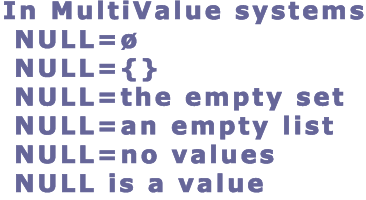
This empty set is implemented in MV as an empty list. MultiValue solutions permit the value of a variable or the intersection of a row and column (loosly speaking), to be a list of values as indicated in my last mewsing. The list could have 0, 1, or Many elements. If the cardinality is 0, the value is NULL. If the cardinality is 1, the attribute has a single value. If the cardinality is greater than 1, it is more obviously a list. But no matter what the cardinality, the value of an attribute can be modeled as a list, whether empty, single-valued, or multi-valued.
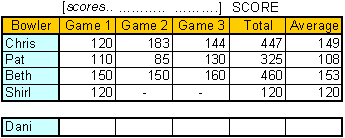
If there are no values in the list, set, or bag, the value of the MV attribute for a particular record would be NULL. If a NULL is encountered by a user when looking at the data, the meaning of that value is no values. So, if Dani has a record of data and the value of her variable scores is NULL, then the corresponding proposition would be: Dani has no values for her score or Dani has no bowling scores. It would not be: Dani's score has no value. Got it?
Just true or false, that's it, two values and the obvious ones at that.
Because each attribute in Pick does have a value, even if that value is no values, logical expressions are easily evaluated. Just true or false, that's it, two values and the obvious ones at that. If there is ever a test for equality, a list of no values is equal to another list of no values. For less than or greater than comparisons, a NULL is less than everything other than another NULL no matter what type of data is compared.
Some might be resistant to this broad use of a NULL value as it gives us no insight into why there are no values for an attribute. If there is a reason to collect information on why an attribute has no values, additional attributes could be included in a logical data model.
In our scenario, we don't know if Dani bowled the games and the scores have not yet been recorded, if Dani bowled and the score was recorded incorrectly, if Dani has not yet bowled, if Dani was sick with bird flu and missed league bowling this week, or if Dani doesn't ever bowl. In the first two cases, our data as recorded is incorrect. So we could interpret the NULL value for scores as Either Dani has no bowling scores or our data is incorrect but that is similar to the interpretation of any value. We could say that either this bowler's name is Dani or our data is incorrect. So that is not particularly helpful. The interpretation of this NULL value, then, is that Dani has no bowling scores. That's it. If there is a NULL value for an attribute, it means there are no values for that attribute.
Our resulting two-valued logic comparisons are quite simple, useful, and meaningful. If we want to list all people with their series total, ordered lowest to highest, we would get those people who have NULL values listed first.
LIST BOWLERS SCORE BY SCORE
If we want only those with values, we could request only those WITH SCORE:
LIST BOWLERS WITH SCORE SCORE BY SCORE
Instead of having no value, we have a value that is a list with no values.
The first SCORE is testing for any values for the variable SCORE, the second shows the value (the ID for the bowler is listed automatically in the output), and the last SCORE is for the ordering. Using this approach, Dani and Shirl have the same value for their second game score. I'm certain this rubs some SQL users wrong. Instead of Dani and Shirl having no score, which would mean the question is meaningless, Dani and Shirl have no scores or an empty list of scores for the second and third games in the series.
This logic can be applied to attributes that have list values as well as those considered to be single-valued since these can also be modeled as lists, even if short ones. You can likely see how there could still be some misunderstandings in interpreting NULLs of this ilk, but it really is an amazingly simple and useful approach to what is modeled as the lack of values in SQL. Instead of having no value, we have a value that is a list with no values.
Continue to next blog →Saturday, March 25, 2006
With Data Modeling, What's Your Bag?

I've been avoiding some definitions for a while now, but when writing about NULLs and two-valued logic, I digressed into explanations of a few terms. Since I'm writing on the road for a few weeks, I thought I'd split out some terminology into this blog and follow with the NULLs blog next. I'll toss in an ending on this one to tie in the title, but otherwise this mewsing is a glossary.
What I know about bowling could fit in a blog entry, but I just adore the scoring system, so I'll use that for the examples, both for these descriptions and for the NULL handling to follow.
- list
-
The scores in the above bowling series that correspond to the three games bowled by one person; such as Chris's 120, 183, 144; compose a list. Each such list of game scores could be the value of a variable named scores. This conceptual list could be implemented with a computer language using an array like score[3], for example.
The length of a list is the number of elements in it. Computer languages vary as to what list implementations permit variable lengths. Other variations in the implementation of lists include whether list members can be accessed directly with an index or require a sequential read. Providing different features for working with a list could prompt one to work with it as a queue or a stack, for example. Lists are a wildly popular structure in any general purpose programming language. They are missing from any implementation of the Relational Model (RM), however.
- set
- If we remove the ordering from our lists, we get a set of bowling scores for Pat and Chris that includes all three scores. However, the set of scores for Beth is {150, 160} because each element of a set must be distinct from the others. The set of Pat's scores could be written as {110, 85, 130} or as {110, 130, 85} because the set has no implied ordering. In the case of a bowling series, it would be a bad idea to treat these scores as a set in this way, given that we would then lose the information about how many games had a particular score, as illustrated in the case of Beth. A list can be transformed into a set, however, by adding an ordinal attribute to identify the first and nth value. We could, therefore, talk about Chris's set of bowling scores in this series as {(1, 120), (2, 183), (3, 144)). A more obvious set might be our bowlers = {Chris, Pat, Dani, Shirl, Beth}. Of course, when specifying our set, we would include a unique identifier for the elements, often referred to as a key, so that our set might look like bowlers = {(11235, Chris), (628628, Pat), (11111, Dani), (223344, Shirl), (98765, Beth)}. We saw above that we can turn a list into a set. We can turn our set into a list by placing it in some order, such as an alphabethic order of Beth, Chris, Dani, Pat, Shirl.
- bag
- Also known as a multiset, a bag is like a set in that it has no ordering and like a list in that it includes duplicate values. The bowling bag for Beth is [160, 150, 150] which is equal to [150, 160, 150] and [150, 150, 160]. It is as if you tossed the values into a bag, pulling them out in any order. We could turn this bag into a set by adding a quantity to each value such as Dani having a set {(150, 2), (160, 1)}. We could turn it into a list by adding order to it, such as numerical order with Dani's list being 150, 150, 160. We talk about SQL result sets. However, because a result set may have duplicate rows, these would more accurately be termed result bags (or multisets, but that term is not as fun so I use it only like I use table tennis instead of ping pong).
- relation
- Given my approach to the relational theory of data, I prefer to provide a clean, clear, crisp definition of a relation from mathematics, leaving it to others to embellish it as befits their application of this mathematical concept. A relation is a subset of the set of ordered tuples (A1, A2, ... Am) formed by the Cartesian cross-product of sets S1 x ... x Sm where each An is an element of Sn. Note that a relation is a set. Bags are not sets. Therefore, SQL result sets are not relations. The prior example of a set with couples consisting of bowler id and bowler first name is a relation.
- domain
- Given a relation R, a domain is a set Sn such that for each tuple (A1, A2, ...An, ...Am) in R, An is an element of Sn. The example relation has a domain of bowler ids and another domain of bowler first names.
- function
- A binary mathematical relation with at most one b for each a in (a,b). Note that either or both a or b could be a relation, for example.
- type
- A type is a domain, so it is a set, plus related functions. Some folks define domain and type to be identical, typically tossing operations into the definition of each. You might note that this is either similar to or the same as the term class, depending on your definition of that term.
- scalar
- As with many of the terms above, this term may be applied to either a variable or a value. A scalar variable can hold only one value at a time. A scalar value is a single value. It is the opposite of composite. List, set, bag, relation, and function are examples of composite types. Common scalar types defined in computer languages are char, int, float, double, and boolean.


Take a look at this scorecard for a single game of bowling. There are many ways to pour the scalar values into composite types when modeling these data for use in a software application. If you were not tied to everything being a relation, what would be your first take on how to model frames in a game of bowling? That strikes me as a list. Like one of those how many triangles do you see puzzles, how many bags can you find? Sets? Lists?
To set us up for the NULLs discussion, I'll provide a little information on the MultiValue (MV) model. Conceptual sets are implemented in MV as either sets or lists. If modeling a strong entity, they are typically modeled as sets. When modeling a property of a strong entity, they are often modeled as lists. Bags and lists are always modeled as lists unless they are first changed into sets by adding attributes. Sets are top level data structures, while lists are always child structures.
The translation from the conceptual data model to the MV logical data model (see this mewsing if confused by these terms) includes modeling a conceptual set as a list. If an implemented list is a set conceptually, the developer must provide the logic to test if a value is already present before adding it. If it is a semantic bag or set, the developer needs to ignore the ordering. This is a bit more difficult because the query language only checks equality of lists, not bags or sets. A test for equality of [150, 160, 150] to [150, 150, 160] would evaluate to false. A developer might choose some order for this bag, turning it into a list, to avoid this complexity.
While the full collection of information about whether a value is a conceptual list, set, or bag is not available for implemented lists in an MV system, you can use the MV array (list) data type to implement all three concepts. If you try your hand at modeling data this way, you might find that it is often conceptually simpler than modeling exclusively with sets. I, for one, like modeling with data sets that have nested lists. At the risk that you might be too young to be hip to this slang, I'll ask: when it comes to modeling data, what's your bag?
Continue to next blog →Sunday, March 12, 2006
In Every Job That Must be Done There is a Data Element of Fun

In every job that must be done there is an element of fun. You find the fun and snap, the job's a game. -Mary Poppins
While SQL has many advantages over the languages stemming from GIRLS, the reverse is also true as the latter is quite charming. I will continue my exploration of some of the advantages of the GIRLS family of query languages. I am not proposing that the entire industry adopt GIRLS, but there are things we can learn from this language and related data model.
There are fewer files in an MV-based application than tables in a similar SQL-DBMS solution. This makes sense given that MV solutions are not in 1NF, so properties with multiple values need not be split out into separate tables. With more nouns modeled as properties of entities, more files than tables are related to primary entities of people, places, things, or events. There are fewer nouns modeled as weak entities in an MV solution.
Users of the GIRLS-related query language ask questions about the data by way of exactly one file at a time, somewhat analogous to using a single SQL view in a query. That doesn't mean they can only report against base (stored) data identified in that file dictionary, but that they are viewing the data in the context of a single entity at a time. Just as a secretary in the 1950's picked a file cabinet in which to find information, the user of the MV query language chooses a single file for each question they ask.
Each MV file, or entity, provides one lens through which a user looks at the world of data. This might seem very restrictive, but just like Mary Poppins hauling a large coat rack out of her small carpet bag, data of all sorts can come from each such file view of the data. Through the eyes of a file dictionary, a user can query data stored under that name, or data derived from any of the data in the system, including aggregated data.
Each dictionary is like a Land's End catalog section related to one entity. The user can shop from any one of the available catalog sections in a system. Did you want to be in the STUDENTS section, FACULTY, CLASS_ROSTERS, or ACCOUNTS_RECEIVABLE section...? Once you are there, you can pick the data you want from the list of data elements on-hand. Some data are cross-listed in multiple catalog sections.
As mentioned in the previous mewsing, this listing will show one result (not necessarily one line) per student. The majors and advisor names will show on multiple lines when there are multiple entries for these.
Pickies have been doing OLAP directly against their OLTP data since the 70's.
It is likely worth a full exploration in a future mewsing, but I'll just make a quick note that because of this approach to the data, metadata, and the related query language, Pickies have been doing OLAP directly against their OLTP data since the '70's, without a need to reshape it first. This is very cool. Of course they also create data marts for some analysis when appropriate, such as when data need to be frozen. A file with a compound key (called a multi-part key in MV) is automatically a virtual fact table from which you can retrieve or derive any data you would want from the dimensions, forming a virtual fact-dimension or cube perspective of the data.
One downside for this approach is that the carpet bags are not pre-packed with everything. You must add to the vocabularly for the queries (the schema) by defining virtual fields for anything that is not defined as a stored data element under this file name. So the file dictionaries become very long catalogs of base or stored data and definitions for derived data. To help develop complex virtual elements, which I'll refer to as taking your medicine, the spoonful of sugar is that you may refer to subroutines written in Pick/BASIC, a very data-savvy general purpose programming language. So, the sky's the limit, but typically each virtual element dictionary item must be constructed either in the dictionary or inline in a query. Unlike SQL, GIRLS is not powerful enough to write every query strictly from the base schema for stored data.
Adding derived data elements is quite gratifying in a big-bang- for-the-buck way
Developing virtual data elements in Pick has the feeling of enlarging the catalog of offerings in the logical view for the user querying the data. Developing views in a SQL-DBMS has the feeling of shrinking the view of the data for users. With the former, the dictionaries, or logical views, can get junked up with lots of unnecessary vocabulary. Developers talk about the need to clean the dictionaries as one might suggest cleaning an office. In spite of that, there is a sense among both end-users and developers that this is our junk and, therefore, within our control. The environment is very empowering for users. With SQL, your views can get brittle with difficulty adding attributes and retaining performance and existing reports on the view (for example, when you add a property with multiple values resulting in more rows in the changed view). There are variations on virtual field definition in several other DBMS's, with Microsoft SQL Server likely having the best such implementation among the SQL-DBMS's.
I can't quite put my finger on it, but compared to coding SQL views, adding derived data elements is quite gratifying in a big-bang-for-the-buck way. It is often a big point of collaboration between developers and end-users. It's very plain to see how simple it is to think in terms of querying your enitities individually. No matter what new requirements end-users have for querying the data, you can add virtual data elements into the carpet bag for an entity without performance penalties for adding elements nor the same performance penalities often incurred with an SQL JOIN. This makes the possibilities for queries about that entity even more magic. "In every job that must be done there is an element of fun."
Continue to next blog →Wednesday, March 08, 2006
Data for Every 1

Queries and reports. Let's talk about 'em. My plan was to do an overview comparing the query language formerly known as GIRLS with SQL in this one blog entry and then move on to features of reporting tools in general. But I'm scratching that and blending the two. Instead of listing a whole bunch of differences, I'm going to take it nice, and easy, 1 thought at a time. Please recognize that this is not about trying to convince anyone to use my favorite query language; it is much more general than that, with concepts that might also apply to XQuery or any other query language.
Terms that crop up with SQL include the RM, 1NF, and 3VL. Terms that relate to GIRLS are MV, Pick, NF2, and 2VL. Through the eyes of these two query languages, I hope to illustrate some significant differences in data models.
Let's dive into a contrived example of a school system booster club sale of frozen pizzas: multiple pizzas sold through multiple school booster clubs in a single school system. If we had an information system, we might want to query it asking about the people who bought the pizzas, perhaps for a mailing list. We might also want information about the pizzas, maybe for forecasting of supplies for future events. We might ask which booster clubs sold which pizzas so we deliver the pizzas to the right places. Those are all 1 entity instance questions. We are asking a question about each 1 instance of people, pizzas, or clubs.
It is typical to want 1 chunk of information for every 1 instance of an entity.
It is typical to want information about some entity or other, whether people, places, things, or events. Additionally, it is typical to want 1 chunk of information for every 1 instance of such an entity. Optionally, you might want to aggregate information into groupings bigger than 1 asking, for example, how many pizzas each booster club ordered. We might otherwise split out the instances by requesting information about a multivalued property. For example, we might ask how many pizzas have pepperoni as a topping.
In any case, starting with 1 and then listing, grouping, or splitting from there is a very common way to think. 1 might even suggest it is natural. If you walked into a business in the 1970's, or even today, you would find filing cabinets dedicated to 1 single entity, such as Customers or Orders, often with a folder for each instance of that 1 entity. Why? It has to do with how we think, I would think. 1 might be the loneliest number, but it is conceptually very powerful.
A pizza chef team has been organized to assemble all of the uncooked pizzas and put them in boxes, with cooking instructions attached. They would like each box to have a Pizza Description Label, including a unique Pizza ID, the type of crust, the list of cheeses used, and the list of toppings. Sure, you might have mixed cheeses and toppings in a single attribute or split out meats and veggies into separate ones, but just stick with me and don't let your mind wander in that way. (I'll also hold off any discussion of list compared to set or bag for a rainy day. Let's just say that this list of toppings is rather like a shopping list.)
LIST PIZZAS CRUST CHEESES TOPPINGS WITH PIZZA_ID = "12345"
| Pizza Description |
|---|
|
|
SELECT
PIZZA_ID, CRUST, CHEESE, TOPPING
FROM
PIZZA_VIEW
WHERE
PIZZA_ID = "12345"
ORDER BY
CHEESE
But this isn't going to be quite the same, is it? There are insignificant details such as whether column headings and unique id's come along for the ride, but there there is the matter of how to create the PIZZA_VIEW and what the output from the above SELECT would be like. The view might be produced with something like this:
CREATE VIEW PIZZA_VIEW AS (SELECT P1.PIZZA_ID, CRUST, CHEESE, TOPPING FROM (PIZZA AS P1 JOIN PIZZA_CHEESE AS P2 ON P1.PIZZA_ID = P2.PIZZA_ID) JOIN PIZZA_TOPPING AS P3 ON P2.PIZZA_ID = P3.PIZZA_ID)
If we take the above view and the previous SELECT on it, we might get a label something like the one below.
| Pizza Description |
|---|
|
|
I'm a bit rusty on SQL and I'm not doing anything clever here to handle the multiple 1-M (one-to-many) relationships, but feel free to add comments on how the view or query on this data could be set up better. I think the party line is that the data are all there and how it is displayed is a task for a reporting tool. But look at how the query language shows up this key difference in the data models. With GIRLS we ask questions while thinking about 1 thing, listing, aggregating, or splitting them all the while with a sense of 1-ness.
A significant issue for professionals who are learning SQL after only knowing languages that derived from GIRLS is the change to thinking about going from the many to the 1 in their thinking instead of from the 1 to the many. It didn't seem like they ever had to learn to start with 1, but they definitely do have to learn to start with many instead.
Moving the story forward, we have just found out that the green peppers are delayed and we have decided not to wait any longer. We are going to have the delivery team get all the pizzas without peppers to the right booster clubs now. The delivery team has requested a list of the Pizza IDs that need to be loaded in the delivery van. So, we need a listing of all Pizza IDs for pizzas without peppers as a topping.
LIST PIZZAS WITH EVERY TOPPING <> "PEPPERS"
SELECT P1.PIZZA_ID FROM PIZZA AS P1 WHERE P1.PIZZA_ID NOT IN (SELECT P2.PIZZA_ID FROM PIZZA_TOPPING AS P2 WHERE TOPPING = "PEPPERS")
It just doesn't matter to GIRLS if there is an attribute, such as topping, that has multiple values for a single pizza. We can still look at data for every 1.
Continue to next blog →